Construction project accounting your investors can follow, live
Suppliers enter their own quotes, investors approve before the order is placed, and every cost lands in each investor’s account by share. No PDFs to retype, no spreadsheets to send, every step on record.
01Every cost, split by share.
02Every purchase, approved by those who invest.
03Every investor, with only what is theirs.
Built for those who build with other people’s money
- 01
Set up the project and the shares
Each investor with their percentage. Shares add up to 100%, and every cost is split by them.
- 02
Suppliers quote in the system
Invite your suppliers: they enter their prices themselves, before the deadline and under your ceiling. Nothing to retype.
- 03
Investors approve, your team buys
The winning quote goes to the investors under the project’s rule, then becomes the order, the delivery and the bill.
Everyone in the loop
Suppliers quote in the system and investors follow their projects in the portal: both take part in the work itself, not just in the report afterwards. Both are always free.
Automatic split by share
Each cost recorded on the project goes straight into every investor’s account, in proportion to their share.
Investor approval of purchases
Choose per project: majority by share, unanimous, any one investor or selected investors, with a deadline and what happens if nobody answers.
The whole project in one place
MS Project schedule, purchasing with quotes, inventory, payables and receivables, treasury and accounting, or QuickBooks.
Purchasing, inventory and project finance, in one system.
The whole project operation in one system, with investor reporting as a by-product of daily work rather than one more report at month end.
Purchasing with a trail
From the site’s request to the goods received, every step is recorded.
- Item requests per project and approval of quantities
- Quotes from several suppliers and choice of the winner
- Investor approval before the order, when the project requires it
- Orders split into deliveries per project, received against the invoice
Inventory by warehouse
Each project with its own warehouses, stock and average cost per item.
- Automatic stock entry when purchases are received
- Requisitions to the site, with approval and fulfilment
- Stock counts, transfers between warehouses and minimum levels
- Stock ledger for every item
Project finance
Each project’s money kept apart, reconciled and explained.
- Payables, receivables and recurring bills, with instalments
- Cash movements, transfers and bank statements
- Cash flow
- Builder’s management fee
Investors and shares
Each investor’s contributions and how they are allocated to projects.
- Shares per project, adding up to 100%
- Contributions, allocation to projects and payments made by investors
- Account for the project and for each investor
- Cost and fee report per project, in PDF
Schedule and budget
Your MS Project plan tied to the project’s money.
- Schedule imported from MS Project, with versions and a baseline
- Budget per task and planned vs. actual
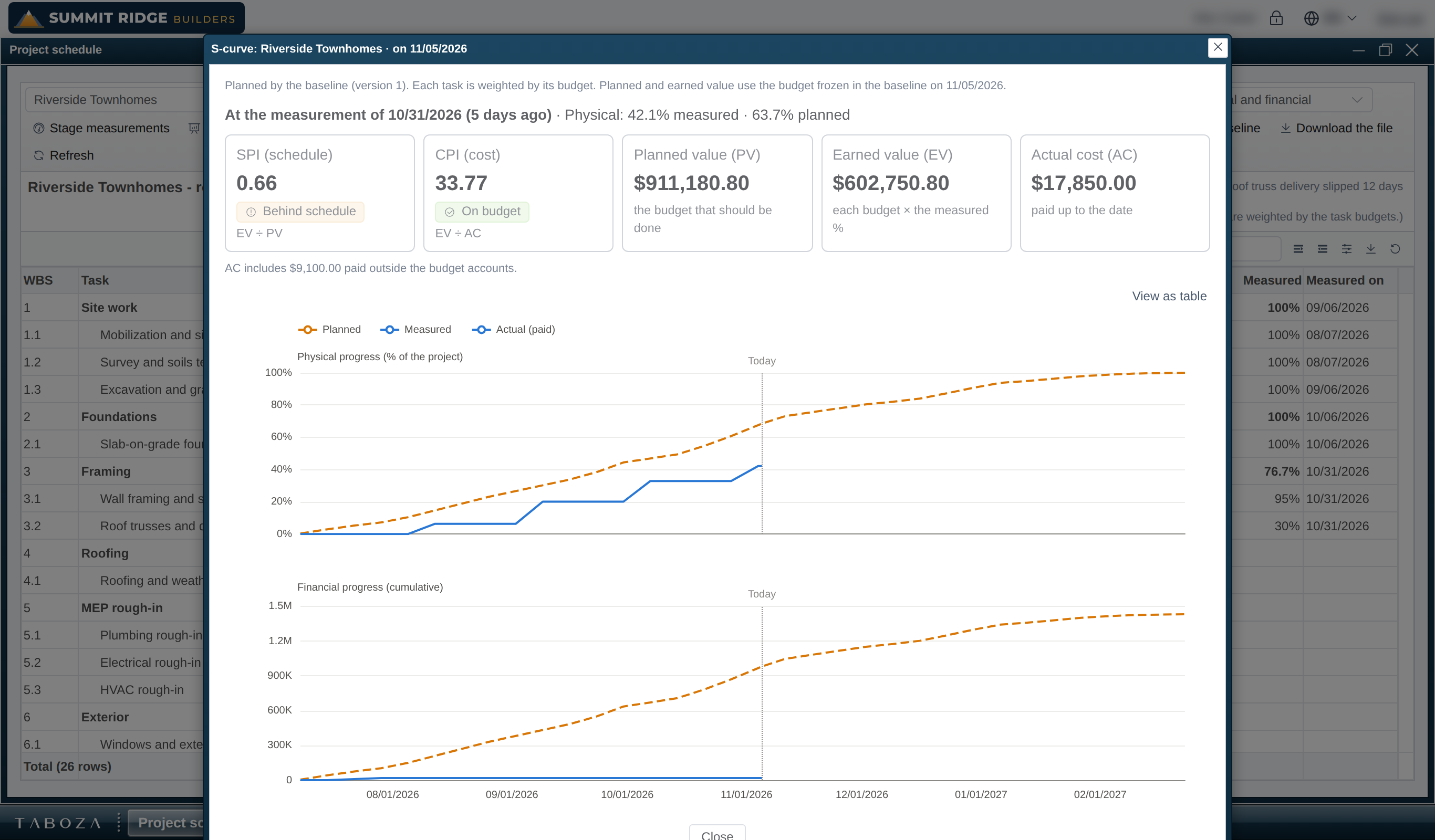
- Progress measured from the phone, and the S-curve
- Capital call suggestions from what the project will spend
Accounting or QuickBooks
The books come from the operations themselves, or everything flows to QuickBooks Online.
- Journal, ledger, trial balance, income statement and balance sheet generated from the entries
- Bank reconciliation and period close
- Two-way integration with QuickBooks Online
- A dedicated role for your accountant
Everyone sees what they need
Roles with the features each job needs (buyer, storekeeper, engineer, finance, accountant) and the projects released to each user. Investors get their own access, limited to their projects.
Start with what you already have
During onboarding, the basic records (projects, investors, suppliers, items) can be loaded from spreadsheets.
The screens your team uses every day
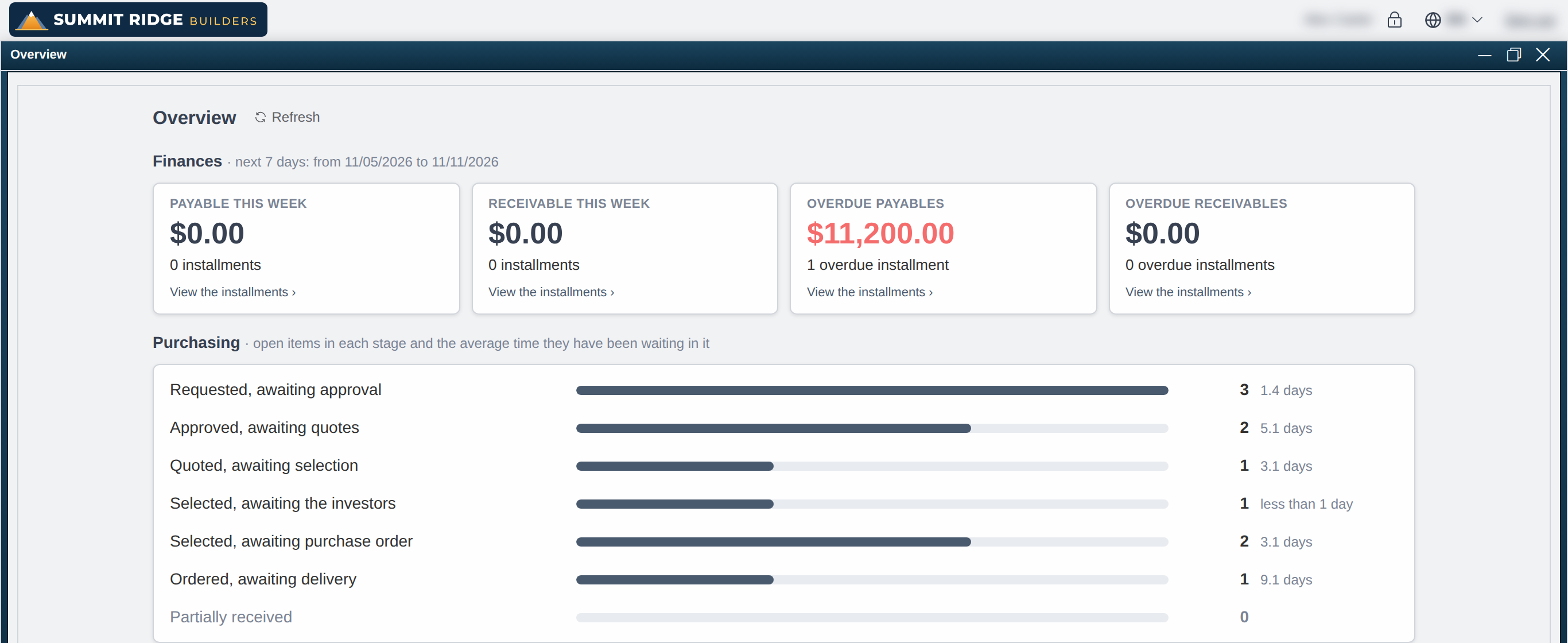
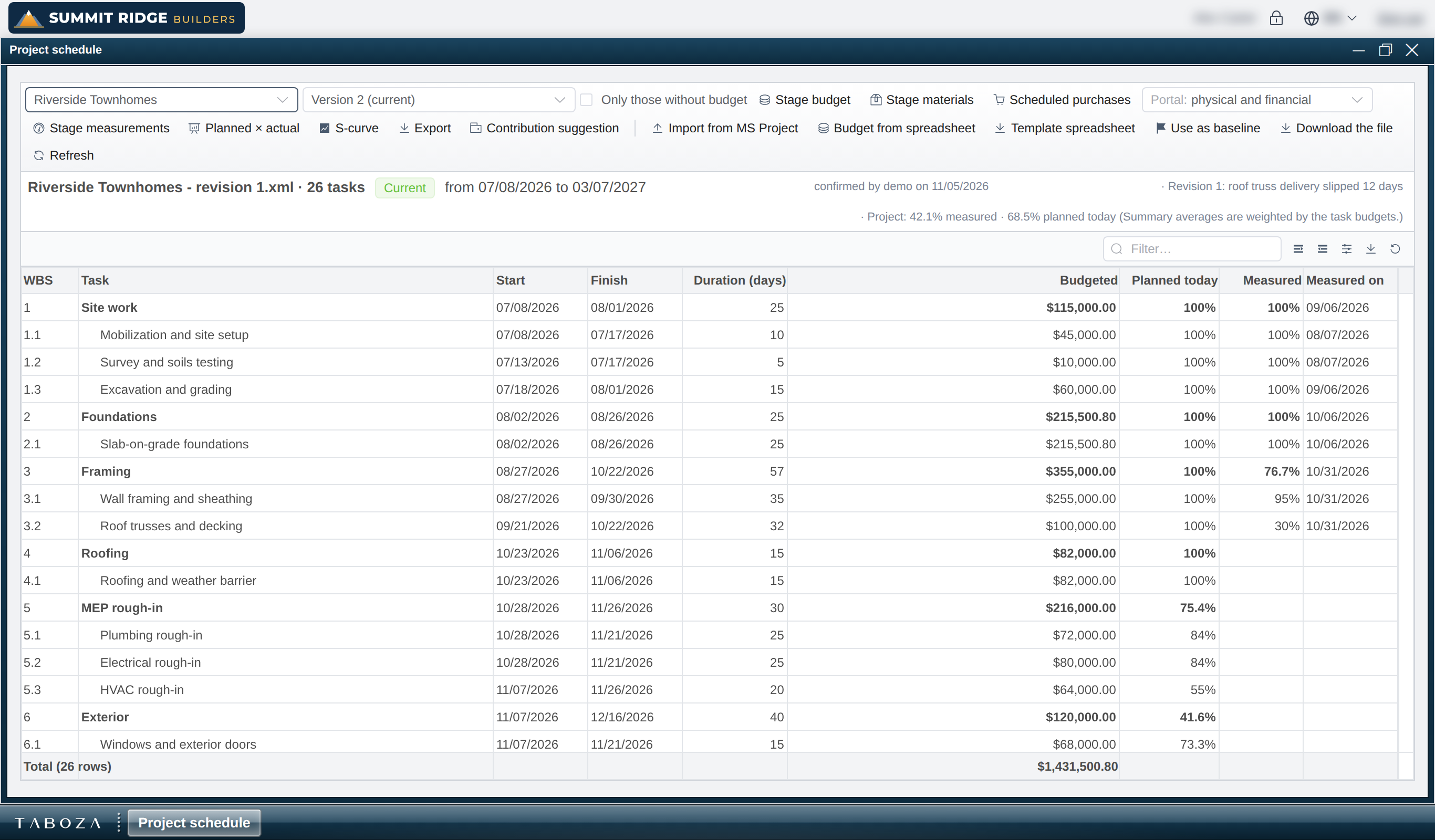
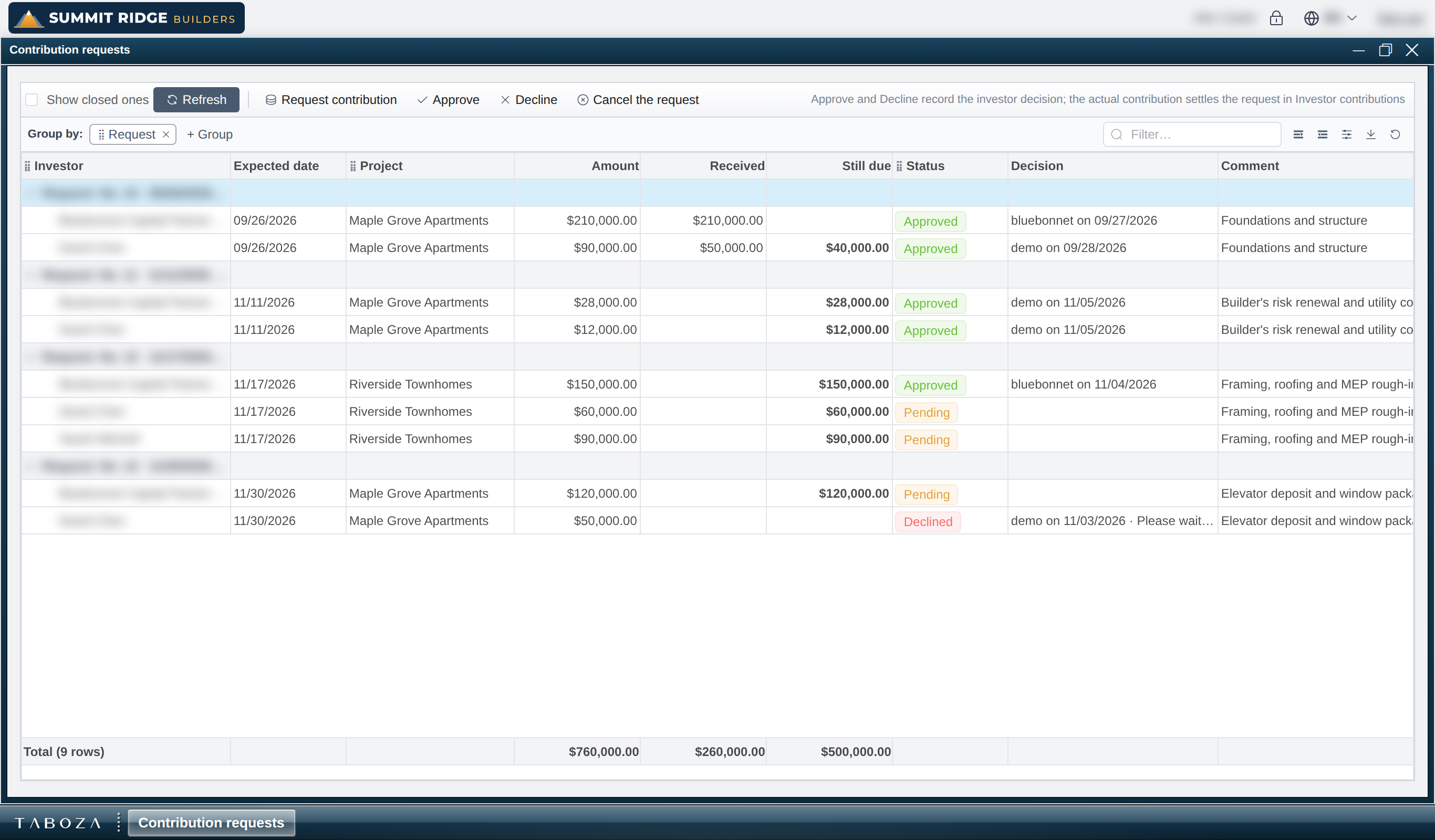
Screenshots of Taboza in a demo builder: the data is made up and the names of clients, suppliers and investors are blurred. Each screen opens in its own window, like on a desktop, and several can stay open at once.
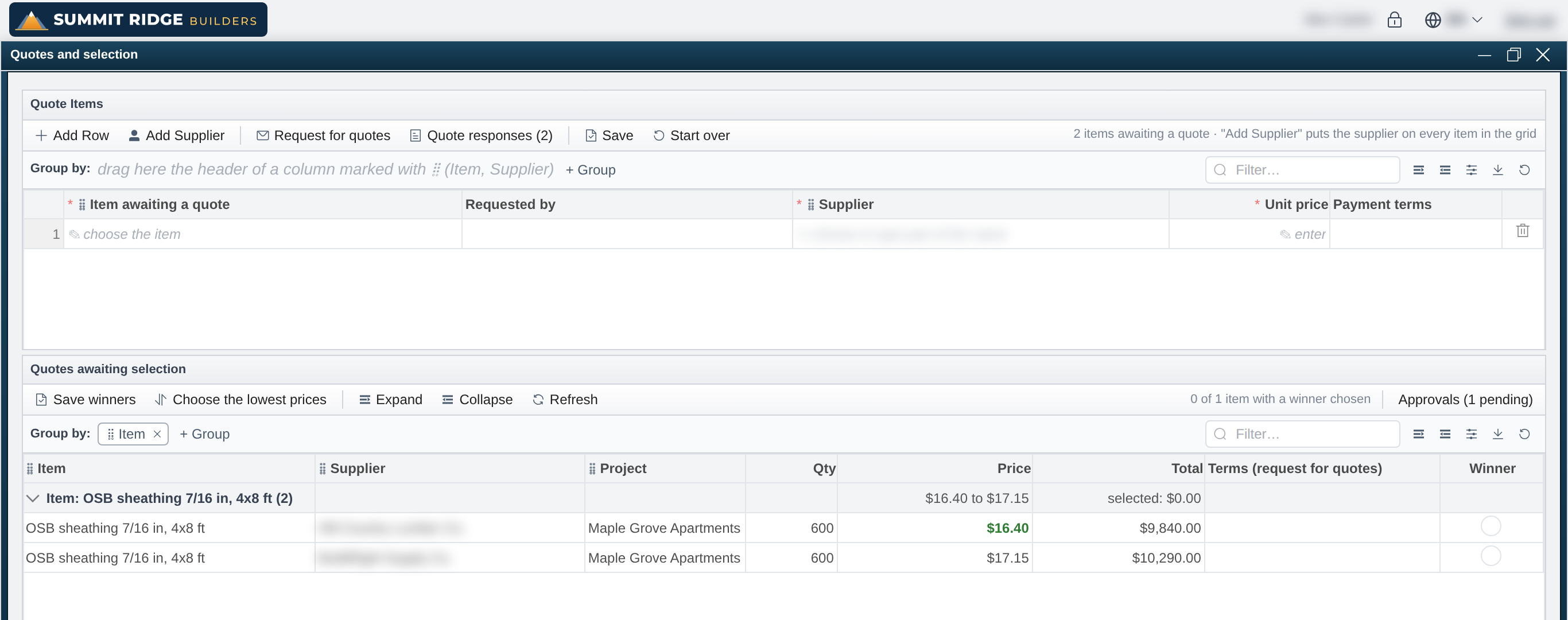
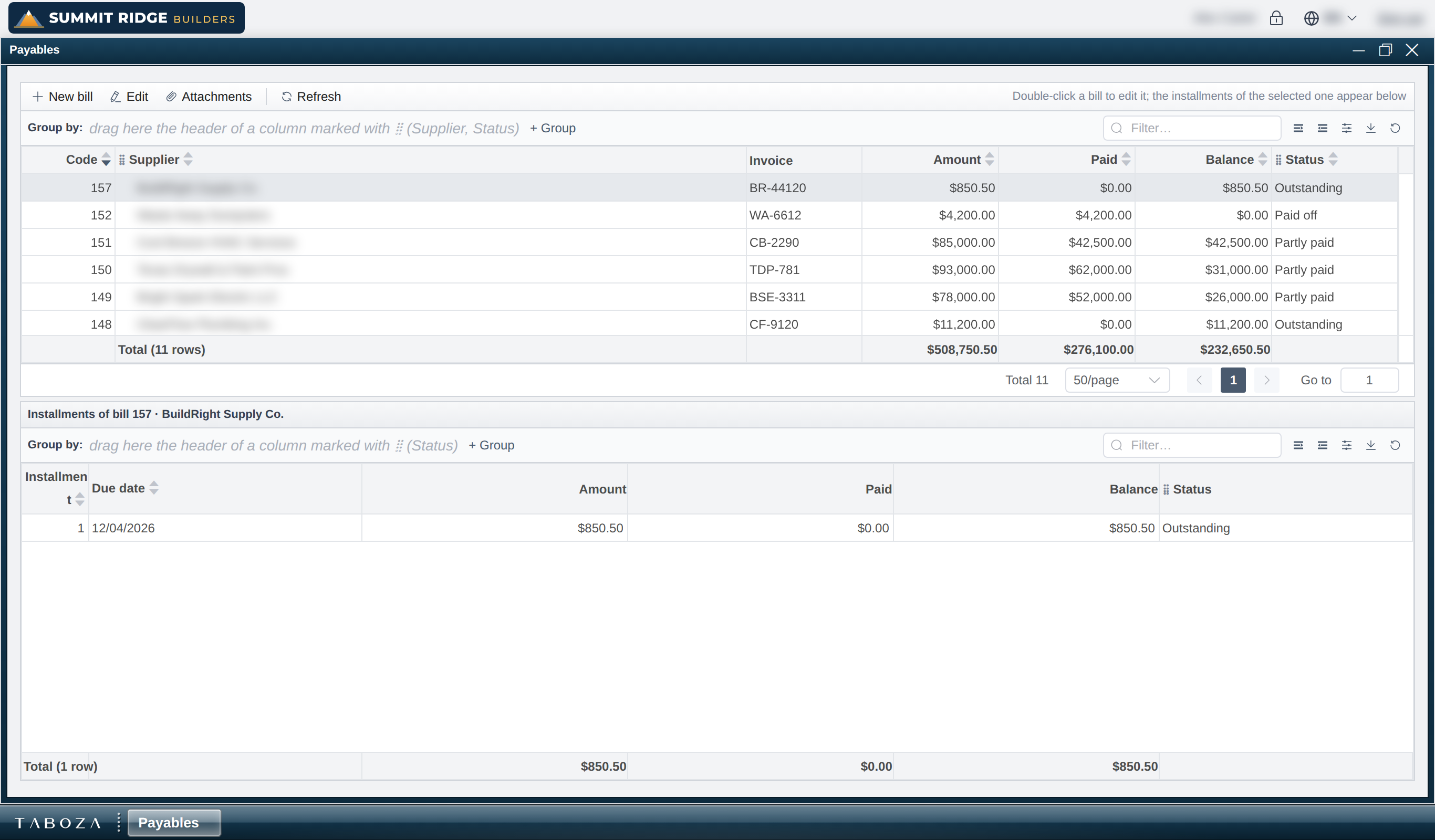
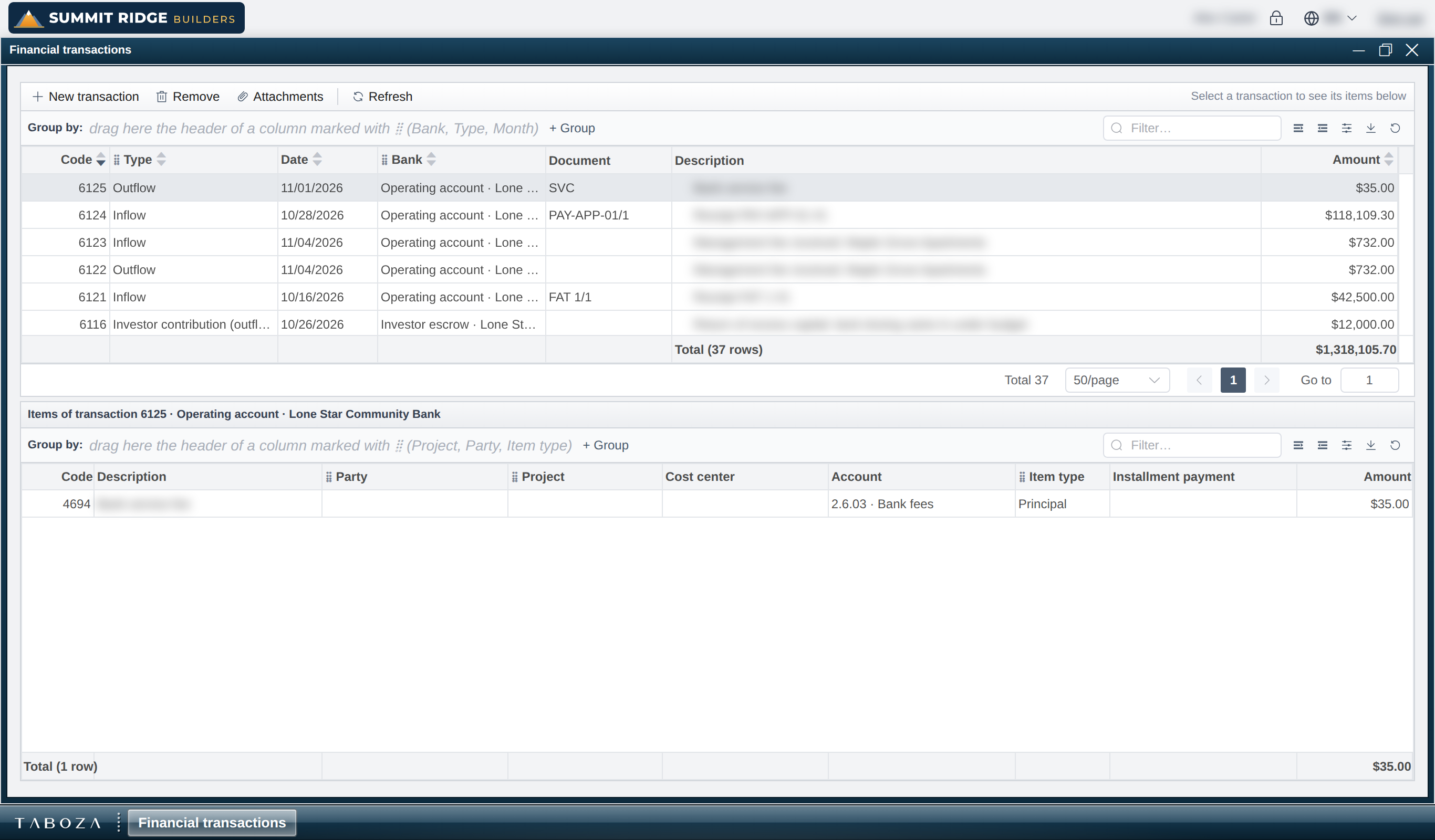
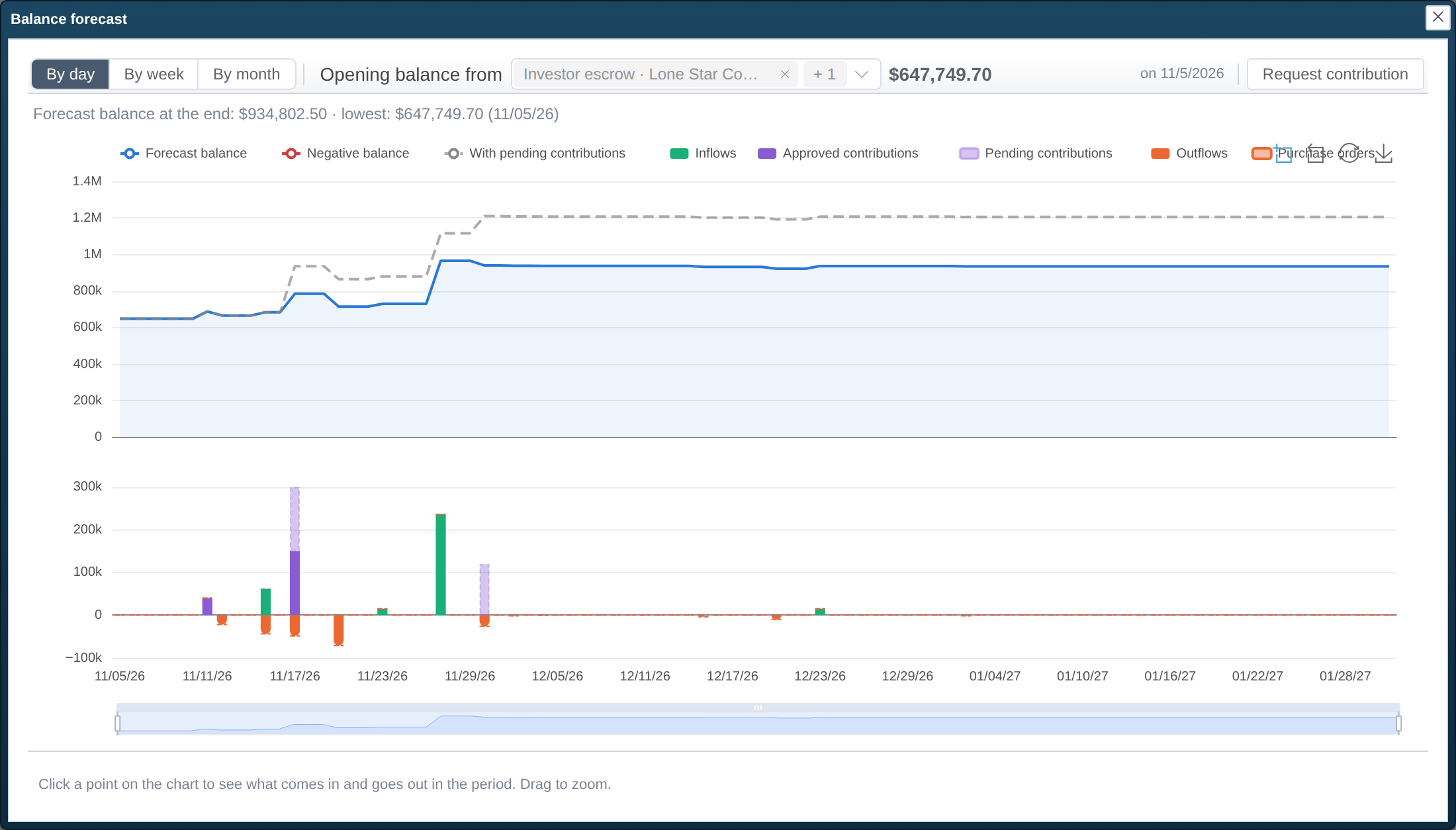
Each investor with their own access to the projects they hold a share in.
You invested in the project. Now follow it, with the real numbers, whenever you want.
Your projects
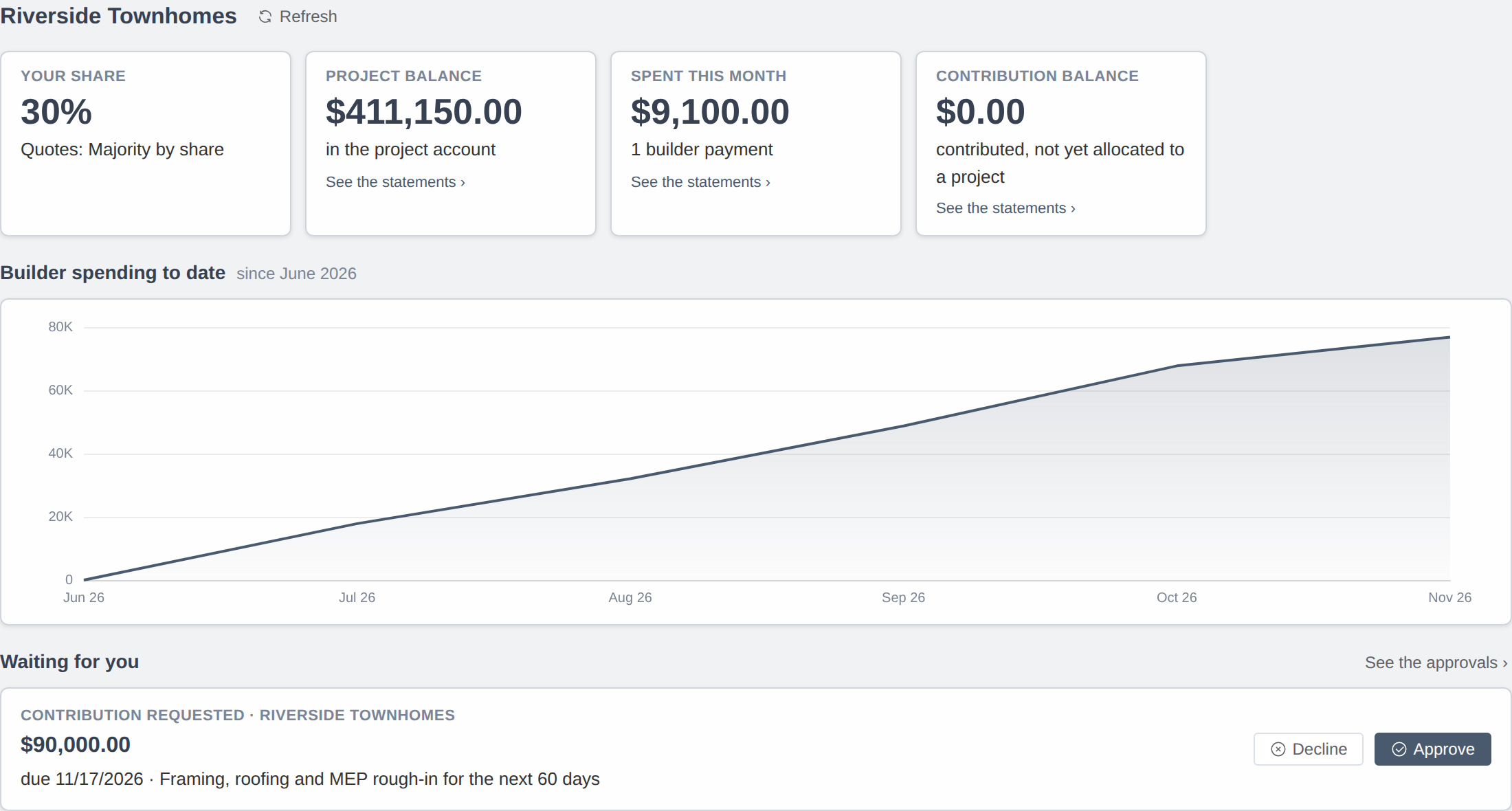
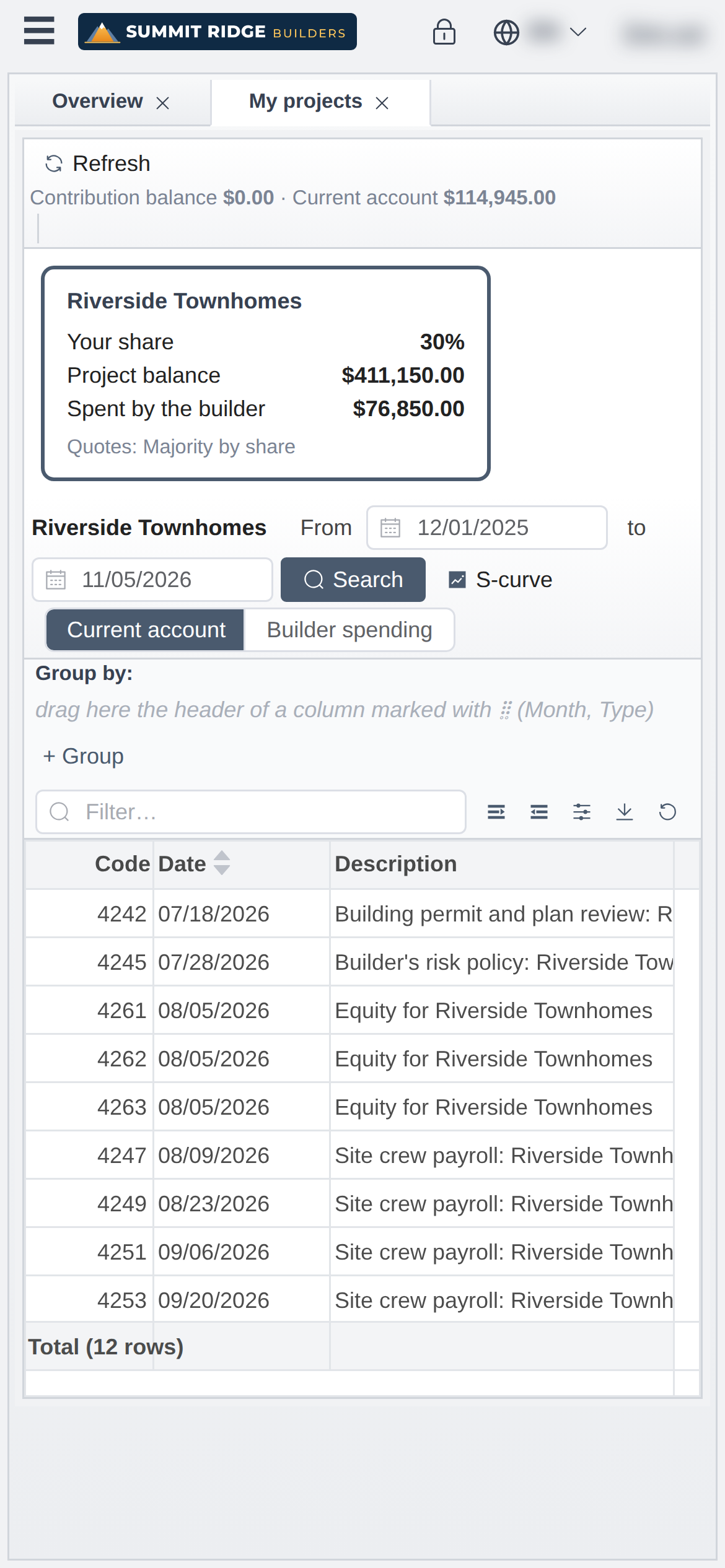
When you sign in, you see the projects you hold a share in: your percentage, each project’s balance and how much the builder has spent.
Your money
Your contribution statement and your account, with every project cost split by your share.
Every cost, one by one
The project account and the builder’s payments for any period you choose, grouped by month.
Your vote on purchases
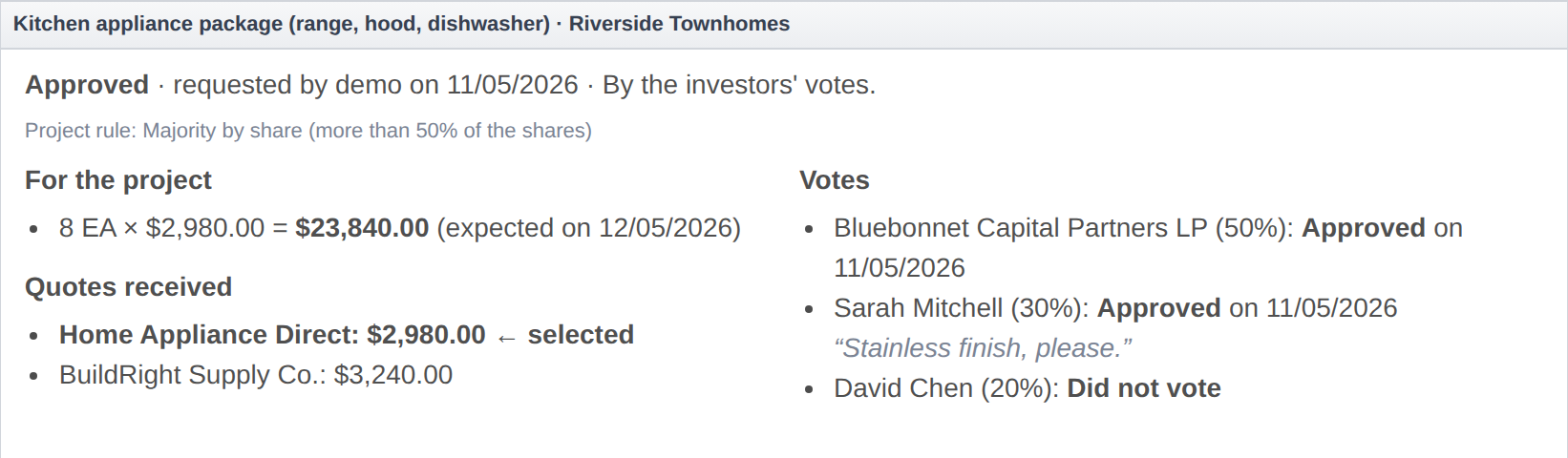
If the project requires it, the builder only places the order after the investors approve. You see the chosen supplier, the other quotes and the total for the project, and approve or reject, saying why.
Only what is yours. You see only the projects you hold a share in and only your own account. Other investors’ numbers and the rest of the builder’s business stay out of reach.
Investors decide together, when the project calls for it.
Each project sets its rule. The builder picks the quote; the order only goes out after the investors vote, with the chosen supplier, the other quotes and the project total in view.
- Majority by share
- Approved when the investors in favour hold more than the set percentage of the shares.
- All investors
- Unanimous: one rejection rejects.
- Any one investor
- The first to answer decides for everyone.
- Selected investors
- Only the designated investors vote, and all of them must approve.
And if someone does not answer: wait, or approve or reject after a deadline in days.
Investor-backed projects
Joint ventures, syndications and silent partnerships
When a builder runs a project with money from investors, one side operates and the other depends on its information. Taboza turns that relationship into numbers everyone can follow.
Managing partner
Records the project’s day-to-day transactions: purchases, bills, payments and the management fee. Reporting follows from those entries.
Investing partners
Each with their own access, seeing contributions, their account and the project’s spending, split by their share.
Decisions on record
When partners must approve purchases, the approval lives in the system, with each vote, comment and date.
History that does not get lost
Every entry carries a running balance, in the project account and in each partner’s. Reports come out in PDF for any period.
Taboza organizes and reports the project’s transactions. Bookkeeping and tax filings remain with your accountant.
Everything the project moves, from the material request to each investor’s balance.
Projects and investors
- Projects with investor shares
- Contribution requests with each investor’s decision
- Project and investor accounts with running balance
- Costs and fee per project
- Investor portal, on the phone too
Purchasing
- Item requests per project and task
- Approval of requested quantities
- Quotes and choice of the winner
- Investor approval of the quote, with a rule per project
- Orders with deliveries per project, and receiving that creates the bill
Inventory
- Warehouses per project
- Stock as an asset or expensed to the project, chosen per project
- Requisitions with approval and fulfilment
- Stock counts and transfers
- Minimum levels and stock ledger
Finance
- Payables, receivables and recurring bills
- Cash movements and transfers
- Bank statements and cash flow with scenarios
- Management fee
- Undo a step with a reversal, nothing deleted
Billing
- Project units and sales invoices
- Contracts billed by progress, with retainage
- Management fee invoiced per period
- Payment terms with down payment and installments
Schedule and budget
- Import from MS Project, with versions
- Budget per task and cost assemblies
- Progress from the phone, in % or by quantity
- S-curve, SPI and CPI
- Purchases scheduled from each task’s materials
Accounting
- Books generated from operations, with a chart of accounts
- Journal, ledger, trial balance, income statement and balance sheet
- Bank reconciliation and period close
- Or integration with QuickBooks Online
Records
- Suppliers, customers and investors
- Inventory items with a reference catalogue and company adjustments
- Cost centres and bank accounts
- Initial load from spreadsheets
Access and use
- A desktop with windows, right in the browser
- In English, Spanish and Portuguese, in the company currency
- Roles per job and projects released per user
- Works on mobile (installs as an app)
- Grids with grouping, search, totals and PDF
Project numbers are sensitive. Taboza was built so that each person sees only what they should.
Each company isolated
Each builder has its own address, and the database itself rejects, on every query, any record from another company. It is not just the application filtering: it is the database.
Role-based access
What each user can see and do comes from their role, checked on the server for every operation, not just hidden on screen.
Investors see only what is theirs
Only the projects they hold a share in and only their own account.
Passwords and sessions
Two-step verification, hashed passwords, lockout after failed attempts, sign-out after inactivity and the list of open sessions for the administrator.
Everything on record
Access only over HTTPS and every change in the audit trail, with who and when. Undoing a step posts a reversal: nothing is deleted.
GDPR and LGPD
We process personal data only to provide the service. See the privacy policy.
Pick a plan by the size of your operation. Subscriptions in US dollars are opening with the founders program.
Loading plans…
In every plan
- Investors and suppliers always free
- Investor portal
- Investor approval of purchases
- Purchasing, inventory and finance
- PDF reports
- Mobile access
- E-mail support
Frequently asked questions
How do I get started?
Subscriptions in US dollars are opening with the founders program: join it, or book a demo, and we set up your company account with you and walk through Taboza with your own numbers. Your data comes in with a step-by-step setup guide. The self-service 15-day free trial is open for accounts in Brazil for now.
Do investors pay anything?
No. The subscription is the builder’s. Investors get a login to follow the projects they hold a share in.
Can an investor see other investors’ numbers?
No. They see the projects they hold a share in, their own account and the project’s spending. Each investor’s account is theirs alone.
Do investors have to approve purchases?
Only if you want them to. Each project sets the rule: no approval, majority by share, unanimous, any one investor or selected investors.
Does it work with QuickBooks?
Yes. Connect QuickBooks Online and keep recording there (Taboza reads each project’s expenses), or record in Taboza and send everything to QuickBooks. Without QuickBooks, the books come from Taboza itself.
Is it available in my country?
The system runs in English, Spanish and Portuguese, in your company’s currency. Subscriptions in US dollars are opening with our founders program: the first 10 builders get 50% off for the first year. Join it or book a demo.
How do I pay?
By credit card, billed in US dollars.
Can I bring my data from spreadsheets?
Yes. Projects, investors, suppliers and items can be loaded from spreadsheets during onboarding.
Does it work on mobile?
Yes. The system adapts to the screen and can be installed as an app.
Can I cancel anytime?
Yes, with no fee.
Show investors the project as it is, today.
Join the founders program or talk to us for a demo with your own numbers.
- Built for investor-backed projects
- Works with QuickBooks Online
- Billed in US dollars